
How to Stop Losing Money to Class No-Shows
It's 6am, the whiteboard says eight people are booked for the WOD, and three of them just aren't there.
Your coach starts the warm-up anyway. Meanwhile, two members who tried to book last night got the "class full" message and went back to bed instead of showing up. By 6:15 you've got five people training in a room built for eight, and three empty spots nobody paid for.
This happens at almost every gym that runs fixed-capacity classes, and most owners just shrug it off as the cost of doing business. It isn't. Every no-show is a seat that could have gone to someone who actually wanted it — and in a boutique studio charging per class or running limited membership tiers, an empty seat is money you already lost twice: once when the no-show didn't pay a penalty, and again when the person who would have taken that spot never got the chance.
Why a headcount on a whiteboard doesn't fix this
A static class list tells you who's booked, not who's actually coming, and it definitely doesn't tell the person you turned away that a spot just opened up. By the time your front desk notices someone bailed, the class has usually already started. The information arrives too late to be useful to anyone.
The fix isn't "text people to remind them" — you already do that, and it barely moves the needle. The fix is making the system react automatically, the moment a spot changes hands, without anyone at the front desk having to notice.
What an automatic waitlist actually changes
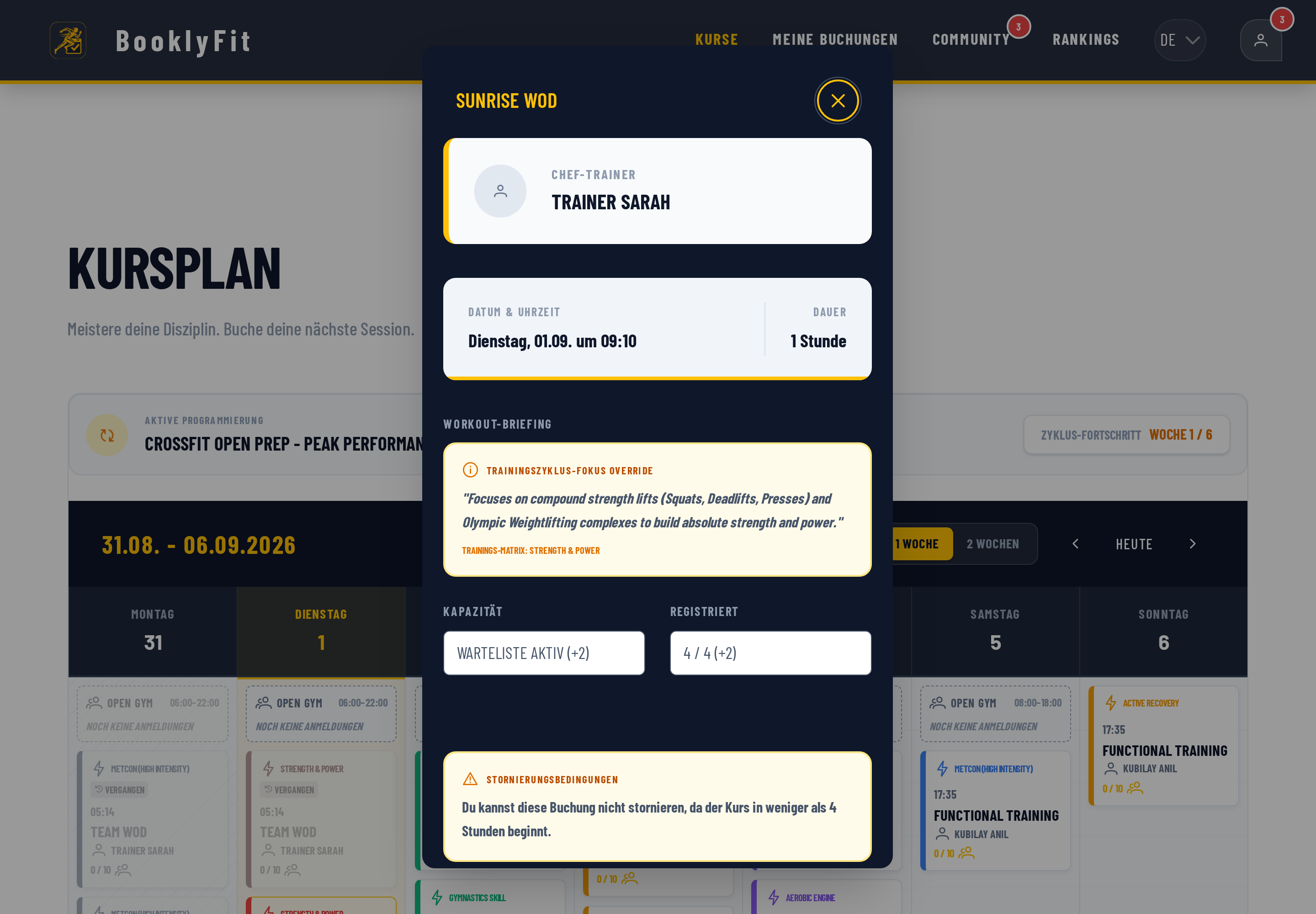
When a class fills up, the next member who tries to book doesn't just get rejected — they get put on a waitlist. The moment someone cancels (or, just as often, the moment your cutoff window passes and a no-show becomes official), the person who's been waiting longest gets the spot automatically and finds out by push notification before they've even opened the app.
That's the whole trick. Nobody at the front desk is refreshing a spreadsheet. Nobody's guessing whether it's worth squeezing in a tenth person "just in case." The seat moves to whoever's next in line, instantly, and your fill rate stops depending on how attentive your Monday-morning coach happens to be.
The other lever: making the no-show itself less free
Waitlists solve the backfill problem. They don't solve the reason people no-show in the first place, which is usually that cancelling costs them nothing. A cancellation deadline — say, four hours before class — changes that calculation without being punitive: cancel in time and it's free, cancel late (or just don't show) and the booking still counts against your plan for the week. Most members adjust their behavior within a couple of weeks once they realize the deadline is real.
If you run drop-in classes for guests, it's worth knowing this cuts both ways: paying guests who cancel before the deadline should get an automatic refund, not a fight over email. Friction in either direction — too easy to no-show, too hard to get a fair refund — costs you word of mouth.
How to set this up in BooklyFit
The waitlist itself doesn't need switching on anywhere — it's built into every class booking. What's worth configuring is the cancellation deadline:
- Open Settings → Booking & System Rules in your owner dashboard.
- Turn on "Enable cancellation deadline" and set how many hours before class it kicks in (most studios start with 4 hours).
- Optional: enable "Automatic class cancellation" with a minimum participant count, so under-booked classes cancel themselves and everyone gets refunded automatically.
- Optional: enable "Show waitlist" so members can see how many people are ahead of them.
See the full waitlist walkthrough in the docs →
What this doesn't solve
To be honest: an automatic waitlist doesn't fix a fundamental attendance problem. If a class is chronically booked at a third of capacity, the waitlist just makes the three people who do come more reliable about it — it doesn't fill an empty room. And an overly aggressive cancellation deadline can backfire: four hours works well for most boutique studios, but crank it up to 24 hours because you want more predictability and, in our experience, you'll hear from exactly the members you least want to annoy — the ones who train spontaneously whenever they find time.
A Tuesday, six weeks later
Same 6am class, same eight-person cap. Two people cancel the night before — one well within the deadline, one an hour before class starts. The first slot goes to whoever's next on the waitlist automatically; the second person eats a no-show against their weekly limit, which they already knew was coming. Seven people walk in ready to train, the eighth spot fills from the waitlist five minutes after the cancellation, and nobody on your team had to do anything except coach the class.
That's not a dramatically different gym. It's the same gym, with the system doing the small, repetitive work of noticing and reacting that a person checking a whiteboard never quite manages to do consistently.
Have you also read?
A Gym Owner's Guide to Handling Drop-In Guests
Traveling athletes just want to pay and train. How a QR code removes almost all the friction.
Running Your StudioSpreadsheets vs. Gym Management Software
What juggling a spreadsheet, a WhatsApp group, and a Stripe dashboard actually costs you in time.
Buying GuideComparing Class Booking Tools: What to Look for in 2026
Pricing model, free tier, EU hosting, waitlists, drop-ins — the criteria that actually separate booking tools from each other.
Ready to see it for yourself?
BooklyFit is free to start — no credit card required.