
The Real Cost of Manual Membership Billing (and How Stripe Connect Fixes It)
The first of the month. You're sitting with the member list, running card payments through one by one — and for two names, you already know it's not going to work.
So you send a message. To someone you see every Tuesday at 6pm class, whose kid you know by name: "Hey, your payment didn't go through, could you check that?" It's not a big deal — until you realize you're writing that message for the fourth time this month, to four different people you actually just wanted to train with, not talk money with.
The time nobody counts
Add it up — charging cards individually, tracking failed payments, generating invoices by hand, sending reminders — and a lot of studio owners land on several hours a month that are pure admin, without a single new member gained or a single class improved. That's time missing from somewhere else: programming, community, or just your own evening off.
The bigger problem: revenue that just disappears
Time is annoying, but the real risk is different. A credit card expires, a payment fails for a technical reason, and if nobody notices and follows up, a technical glitch quietly becomes a cancelled membership — not because the member wanted to leave, but because nobody retried the failed charge. That's revenue lost not to cancellation, but to neglect in the billing process. And it's the hardest kind to win back, because nobody notices it's gone.
What actually changes with automated payments
With Stripe Connect, you link your own bank account directly to BooklyFit — member money flows to your account, not into a shared pool run by the software provider. Subscription payments get charged automatically at the right time. If a payment fails, it's automatically retried several times before anyone has to step in. Invoices get generated and emailed automatically. And you see each member's payment status right on their profile, instead of catching it at the next manual reconciliation.
The difference isn't that payments suddenly never fail — cards still expire, that's normal. The difference is that a failed attempt no longer means you personally have to send someone an awkward message to keep their membership from lapsing by accident.
How to set it up in BooklyFit
- Open the Payments & Billing Dashboard and click "Connect Stripe" to link your own bank account.
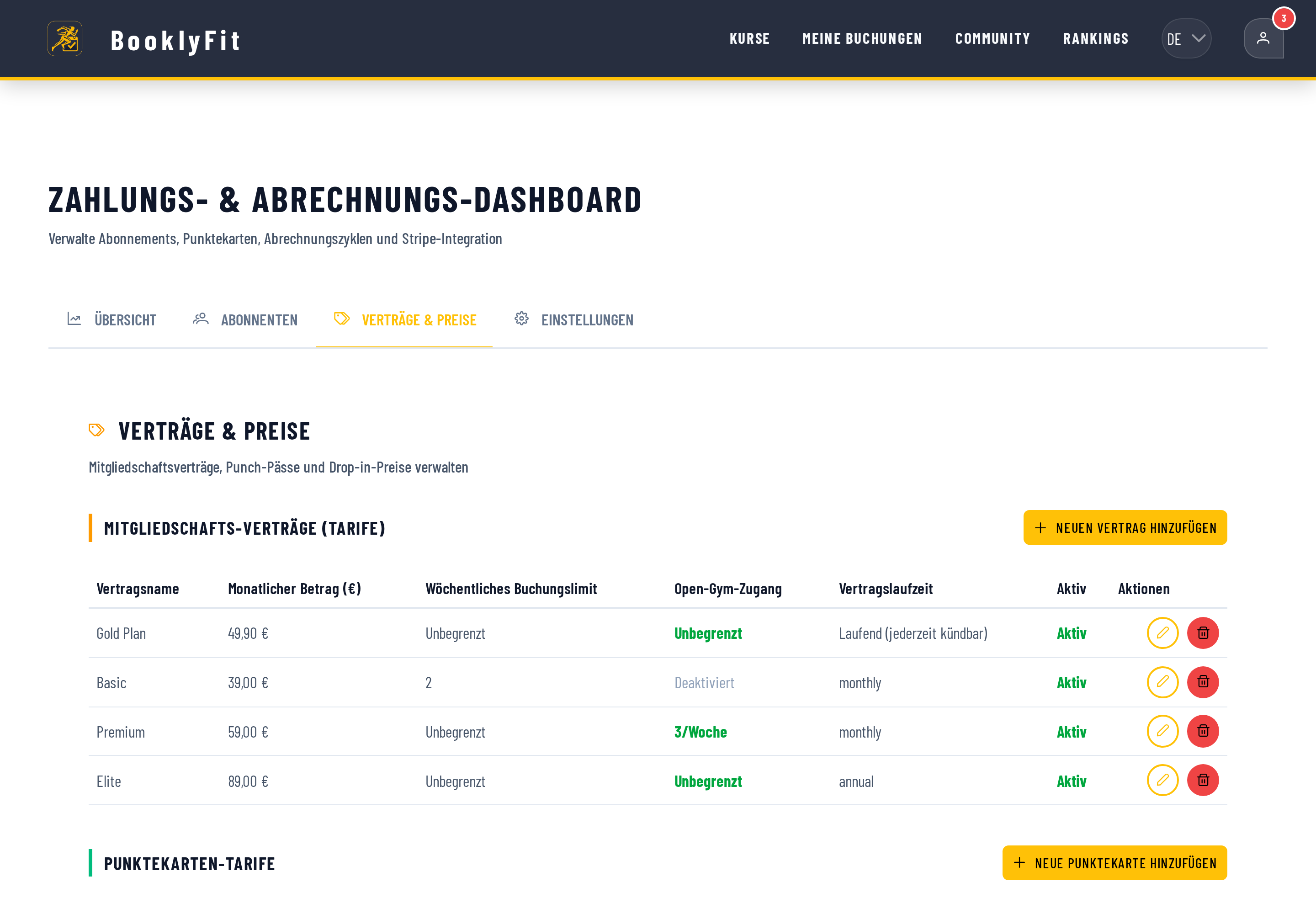
- Under "Plans & Pricing", click "Add new plan" to set up your membership tiers — price, weekly booking limit, Open Gym access, and contract duration all sync automatically with Stripe.
- Optionally add punch pass plans too, for members who want a credit balance instead of a subscription.
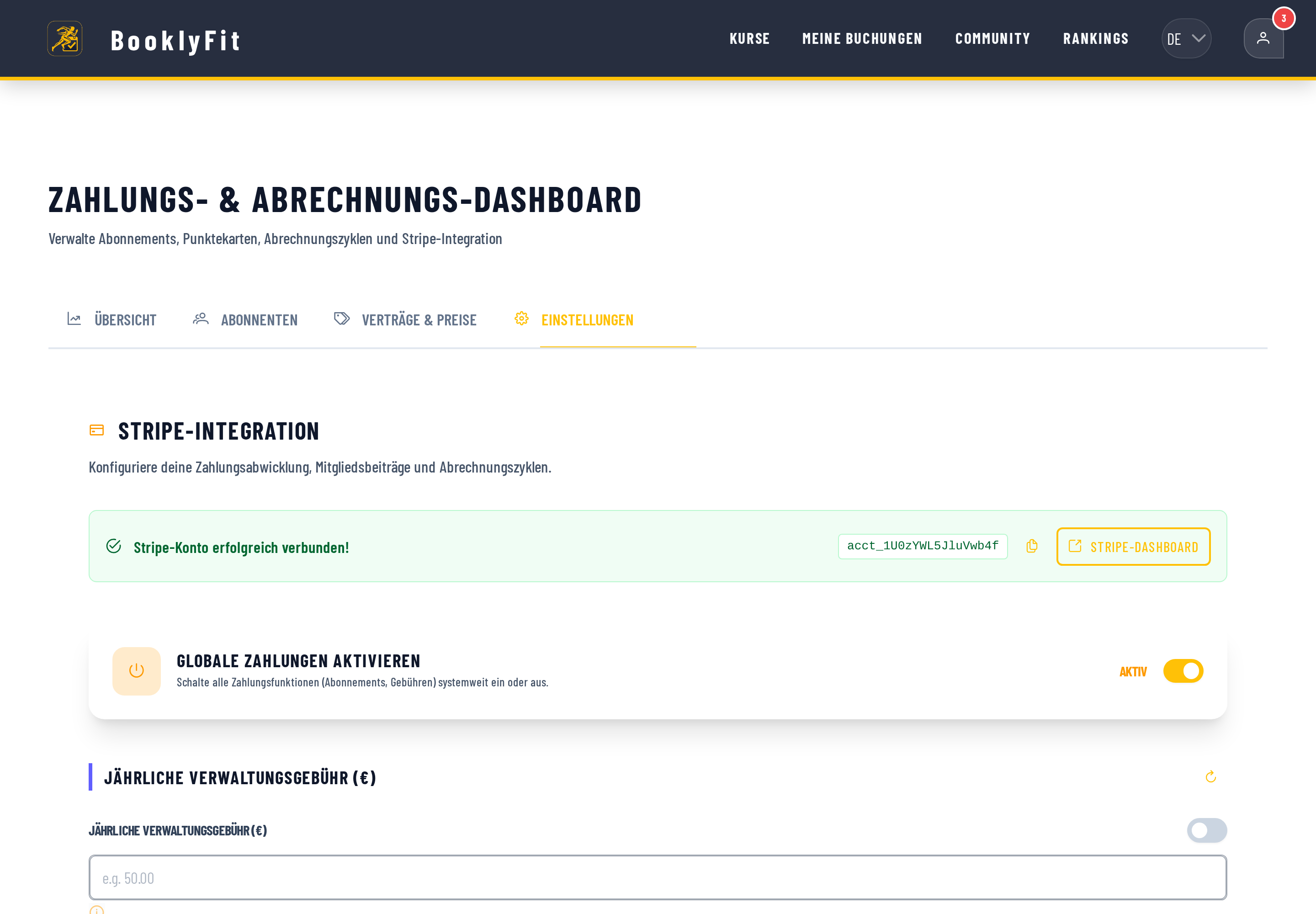
Once payments are live, you can see MRR, punch pass, and drop-in revenue any time in the Overview — no spreadsheet required. You set up your own membership tiers under Plans & Pricing:
See the full guide to memberships & payments →
What automation doesn't take off your plate
To be honest: automated payments solve the repetitive problem, not the edge cases. A refund because someone moved away, a member who wants to switch plans mid-cycle, or a judgment call on a missed cancellation deadline — those are still human decisions you have to make, not the system. What changes is only that you make those decisions on purpose, instead of making them by accident because a failed payment slipped past unnoticed.
The next first of the month
You open the overview, see two failed payments that have already been auto-retried three times, and one short, friendly automatic reminder that already went out. No awkward message you had to write yourself. Just a short list you scan in five minutes before getting back to actual coaching.
Have you also read?
Spreadsheets vs. Gym Management Software
What juggling a spreadsheet, a WhatsApp group, and a Stripe dashboard actually costs you in time.
PricingFree Class Booking Tools Compared
What a "free" tier actually means in practice, and the questions worth asking before you pick a free booking tool.
ComparisonBooklyFit Compared: What to Expect From a Booking Platform — and What Not To
Spreadsheets, generic booking SaaS, dedicated boutique platforms, and BooklyFit compared side by side — honestly, with no competitor-bashing.
Ready to see it for yourself?
BooklyFit is free to start — no credit card required.